

experimental
experimental.fsModuleCache 4.0.11+
功能反馈
请将关于此功能反馈提交至 GitHub Discussion。
- 类型:
boolean - 默认值:
false
启用此选项后, Vitest 会将缓存的模块保存在文件系统上,从而在重新运行测试时获得更快的执行速度。
你可以通过运行 vitest --clearCache 来删除旧缓存。
浏览器支持
目前,此选项不会影响 浏览器模式。
在运行 vitest 你可以设置 DEBUG=vitest:cache:fs 环境变量,来调试模块是否被缓存:
DEBUG=vitest:cache:fs vitest --experimental.fsModuleCache已知问题
Vitest 基于文件内容、文件 id、vite 的环境配置及覆盖率状态生成持久性文件哈希值。虽然 Vitest 会尽可能利用所有可获取的配置信息,但目前仍存在局限性。由于缺乏标准接口支持,当前无法追踪插件选项的变更情况。
如果你的插件依赖文件内容或公开配置之外的因素(例如读取其他文件或目录),则可能出现缓存失效的情况。要解决这个问题,你可以定义一个 缓存键生成器 来指定动态选项,或选择对该模块禁用缓存:
import { defineConfig } from 'vitest/config'

export default defineConfig({
  plugins: [
    {
      name: 'vitest-cache',
      configureVitest({ experimental_defineCacheKeyGenerator }) {
        experimental_defineCacheKeyGenerator(({ id, sourceCode }) => {
          // 从不缓存此 id
          if (id.includes('do-not-cache')) {
            return false
          }

          // 根据动态变量的值缓存该文件
          if (sourceCode.includes('myDynamicVar')) {
            return process.env.DYNAMIC_VAR_VALUE
          }
        })
      }
    }
  ],
  test: {
    experimental: {
      fsModuleCache: true,
    },
  },
})
如果你是插件作者,当你的插件可以通过不同配置选项影响转换结果时,建议在插件中定义 缓存键生成器。
另一方面,如果你的插件不应该影响缓存键,你可以通过将 api.vitest.experimental.ignoreFsModuleCache 设置为 true 来退出缓存机制:
import { defineConfig } from 'vitest/config'

export default defineConfig({
  plugins: [
    {
      name: 'vitest-cache',
      api: {
        vitest: {
          experimental: {
            ignoreFsModuleCache: true,
          },
        },
      },
    },
  ],
  test: {
    experimental: {
      fsModuleCache: true,
    },
  },
})
请注意,即使插件选择禁用缓存模块,你仍然可以定义缓存键生成器。
experimental.fsModuleCachePath 4.0.11+
- 类型:
string - 默认值:
'node_modules/.experimental-vitest-cache'
文件系统缓存所在的目录。
默认情况下,Vitest 会尝试查找工作区根目录,并将缓存存储在 node_modules 文件夹中。根目录的确定基于你所使用的包管理器的锁文件(例如,.package-lock.json、.yarn-state.yml、.pnpm/lock.yaml 等)。
目前,Vitest 会完全忽略 test.cache.dir 或 cacheDir 配置选项,并创建一个单独的缓存文件夹。
experimental.openTelemetry 4.0.11+
功能反馈
请将关于此功能反馈提交至 GitHub Discussion。
- 类型:
interface OpenTelemetryOptions {
  enabled: boolean
  /**
   * 暴露 Node.js OpenTelemetry SDK 的文件路径
   */
  sdkPath?: string
  /**
   * 暴露浏览器 OpenTelemetry SDK 的文件路径
   */
  browserSdkPath?: string
}- 默认值:
{ enabled: false }
此选项控制 OpenTelemetry 支持。当 enabled 设置为 true,Vitest 会在主线程中以及每个测试文件之前导入 SDK 文件。
性能警告
OpenTelemetry 可能会显著影响 Vitest 性能;建议仅在本地调试时启用它。
你可以将 自定义服务 与 Vitest 一起使用,以精确定位正在拖慢测试套件执行速度的测试或文件。
对于浏览器模式,请参阅 OpenTelemetry 指南的 浏览器模式 部分。
sdkPath 的路径解析相对于项目的 root 解析,应指向一个默认导出已初始化 SDK 实例的模块。例如:
import { getNodeAutoInstrumentations } from '@opentelemetry/auto-instrumentations-node'
import { OTLPTraceExporter } from '@opentelemetry/exporter-trace-otlp-proto'
import { NodeSDK } from '@opentelemetry/sdk-node'

const sdk = new NodeSDK({
  serviceName: 'vitest',
  traceExporter: new OTLPTraceExporter(),
  instrumentations: [getNodeAutoInstrumentations()],
})

sdk.start()
export default sdkimport { defineConfig } from 'vitest/config'
export default defineConfig({
test: {
experimental: {
openTelemetry: {
enabled: true,
sdkPath: './otel.js',
},
},
},
})WARNING
请注意 Node 必须能够直接处理 sdkPath 指向的内容,因为它不会被 Vitest 转换。了解如何在 Vitest 中使用 OpenTelemetry ,详情参阅 指南。
experimental.printImportBreakdown 4.0.15+
功能反馈
请将关于此功能反馈提交至 GitHub Discussion。
- 类型:
boolean - 默认值:
false
在测试运行完成后显示导入耗时明细。此选项仅适用于 default、verbose 或 tree 报告器。
- Self:模块导入耗时,不包括静态导入;
- Total:模块导入耗时,包括静态导入。请注意,这不包括当前模块的
transform时间。
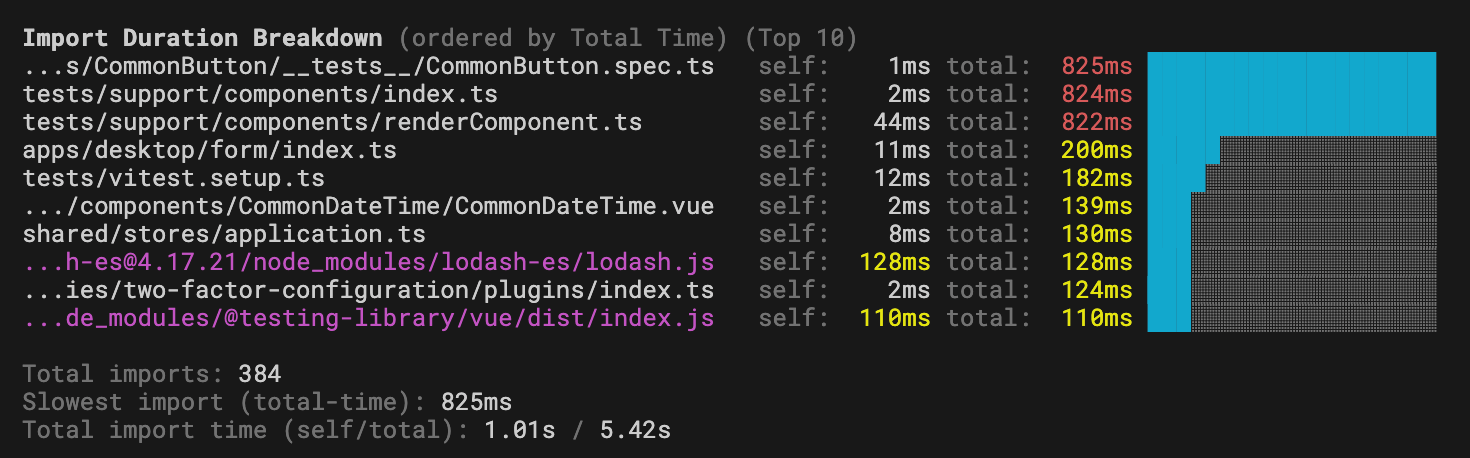
请注意,如果文件路径太长,Vitest 会从开头截断它,最多显示 45 个字符。
INFO
Vitest UI 会在至少一个文件加载时间超过 500 毫秒时自动显示导入耗时分析。你可手动将此选项设为 false 来禁用该功能。
experimental.viteModuleRunner 4.1.0+
- Type:
boolean - Default:
true
Controls whether Vitest uses Vite's module runner to run the code or fallback to the native import.
If this option is defined in the root config, all projects will inherit it automatically.
Consider disabling the module runner if you are running tests in the same environment as your code (server backend or simple scripts, for example). However, we still recommend running jsdom/happy-dom tests with Vite's module runner or in the browser since it doesn't require any additional configuration.
Disabling this flag will disable all file transforms:
- test files and your source code are not processed by Vite
- your global setup files are not processed
- your custom runner/pool/environment files are not processed
- your config file is still processed by Vite (this happens before Vitest knows the
viteModuleRunnerflag)
WARNING
At the moment, Vitest still requires Vite for certain functionality like the module graph or watch mode.
Also note that this option only works with forks or threads pools.
Module Runner
By default, Vitest runs tests in a very permissive module runner sandbox powered by Vite's Environment API. Every file is categorized as either an "inline" module or an "external" module.
Module runner runs all "inlined" modules. It provides import.meta.env, require, __dirname, __filename, static import, and has its own module resolution mechanism. This makes it very easy to run code when you don't want to configure the environment and just need to test that the bare JavaScript logic you wrote works as intended.
All "external" modules run in native mode, meaning they are executed outside of the module runner sandbox. If you are running tests in Node.js, these files are imported with the native import keyword and processed by Node.js directly.
While running JSDOM/happy-dom tests in a permissive fake environment might be justified, running Node.js tests in a non-Node.js environment can hide and silence potential errors you may encounter in production, especially if your code doesn't require any additional transformations provided by Vite plugins.
Known Limitations
Some Vitest features rely on files being transformed. Vitest uses synchronous Node.js Loaders API to transform test files and setup files to support these features:
WARNING
This means that Vitest requires at least Node 22.15 for those features to work. At the moment, they also do not work in Deno or Bun.
Vitest will only detect vi.mock and vi.hoisted inside of test files, they will not be hoisted inside imported modules.
This could affect performance because Vitest needs to read the file and process it. If you do not use these features, you can disable the transforms by setting experimental.nodeLoader to false. Vitest only reads test files and setup files while looking for vi.mock or vi.hoisted. Using these in other files won't hoist them to the top of the file and can lead to unexpected behavior.
Some features will not work due to the nature of viteModuleRunner, including:
- no
import.meta.env:import.meta.envis a Vite feature, useprocess.envinstead - no
plugins: plugins are not applied because there is no transformation phase, use customization hooks viaexecArgvinstead - no
alias: aliases are not applied because there is no transformation phase istanbulcoverage provider doesn't work because there is no transformation phase, usev8instead
Coverage Support
At the momemnt Vitest supports coverage via v8 provider as long as files can be transformed into JavaScript. To transform TypeScript, Vitest uses module.stripTypeScriptTypes which is available in Node.js since v22.13. If you are using a custom module loader, Vitest is not able to reuse it to transform files for analysis.
With regards to mocking, it is also important to point out that ES modules do not support property override. This means that code like this won't work anymore:
import * as fs from 'node:fs'
import { vi } from 'vitest'

vi.spyOn(fs, 'readFileSync').mockImplementation(() => '42') // ❌
However, Vitest supports auto-spying on modules without overriding their implementation. When vi.mock is called with a spy: true argument, the module is mocked in a way that preserves original implementations, but all exported functions are wrapped in a vi.fn() spy:
import * as fs from 'node:fs'
import { vi } from 'vitest'

vi.mock('node:fs', { spy: true })

fs.readFileSync.mockImplementation(() => '42') // ✅
Factory mocking is implemented using a top-level await. This means that mocked modules cannot be loaded with require() in your source code:
vi.mock('node:fs', async (importOriginal) => {
  return {
    ...await importOriginal(),
    readFileSync: vi.fn(),
  }
})

const fs = require('node:fs') // throws an error
This limitation exists because factories can be asynchronous. This should not be a problem because Vitest doesn't mock builtin modules inside node_modules, which is simillar to how Vitest works by default.
TypeScript
If you are using Node.js 22.18/23.6 or higher, TypeScript will be transformed natively by Node.js.
TypeScript with Node.js 22.6-22.18
If you are using Node.js version between 22.6 and 22.18, you can also enable native TypeScript support via --experimental-strip-types flag:
NODE_OPTIONS="--experimental-strip-types" vitestIf you are using TypeScript and Node.js version lower than 22.6, then you will need to either:
- build your test files and source code and run those files directly
- import a custom loader via
execArgvflag
import { defineConfig } from 'vitest/config'

const tsxApi = import.meta.resolve('tsx/esm/api')

export default defineConfig({
  test: {
    execArgv: [
      `--import=data:text/javascript,import * as tsx from "${tsxApi}";tsx.register()`,
    ],
    experimental: {
      viteModuleRunner: false,
    },
  },
})
If you are running tests in Deno, TypeScript files are processed by the runtime without any additional configurations.
experimental.nodeLoader 4.1.0+
- Type:
boolean - Default:
true
If module runner is disabled, Vitest uses a native Node.js module loader to transform files to support import.meta.vitest, vi.mock and vi.hoisted.
If you don't use these features, you can disable this to improve performance.